Organizing Your KDP Publishing Workflow with a Japanese Writing Practice Notebook Interior
Building a profitable self-publishing business on Amazon KDP often comes down to how efficiently you can move from concept to listing. A polished, print-ready interior for a Japanese writing practice notebook gives you a foundational asset that removes hours of layout guesswork. When you have a Japanese Writing Practice Notebook KDP interior already prepared to industry specifications, your energy shifts from repetitive formatting tasks to higher-value decisions around branding, marketing, and niche positioning. The interior becomes a reusable core component within a repeatable publishing process.
This type of asset is not a finished book you upload directly. Instead, it is a set of professional files—typically including AI, EPS, PDF, JPG, and SVG formats—that serve as the backbone of your book. You adapt the document, add your own touches, and produce a unique product that passes Amazon’s content reviews without triggering duplicate content alerts. Understanding how this interior fits into your workflow helps you move faster, maintain quality, and scale your KDP catalog over time.
What the Japanese Writing Practice Notebook Interior Actually Contains
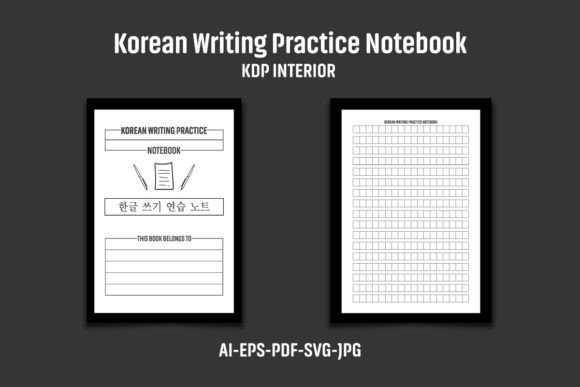
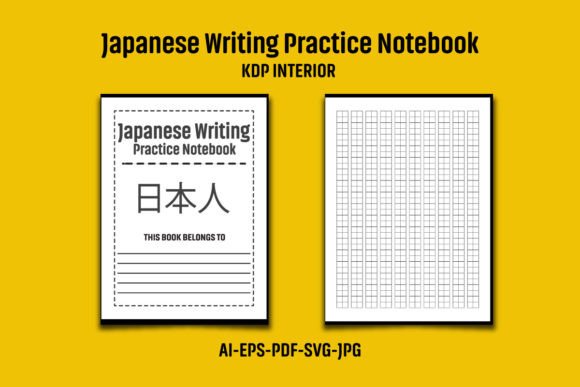
Before you integrate any template, you need to unpack exactly what you’re working with. The Japanese Writing Practice Notebook KDP Interior described here is a multi-format package delivered as a compressed ZIP file. Once extracted, you’ll find a 120-page PDF, an editable AI (Adobe Illustrator) file, an EPS file, an SVG, and two JPG previews or cover backgrounds. The PDF is already sized for a paperback book at 8.5×11 inches with bleed, making the overall dimensions 8.62 by 11.25 inches—the standard KDP required format that accounts for full-page background coverage after trimming.
The design is black and white, which is deliberate for most practice notebooks, and it runs at 300 DPI high resolution. This means text and grid lines will print sharply without pixelation, a non-negotiable for workbooks that users write in. The vector-based AI, EPS, and SVG files let you adjust colors if you decide later to offer a version with blue or gray grids, or even to tweak line spacing for a more customized feel. Because these are editable originals, you aren’t locked into the exact appearance; you can adapt the interior as your product line evolves.
Preparing the Interior for a Successful KDP Upload
Your first practical step is extracting and inspecting the files. Right-click the ZIP and use WinZIP, WinRAR, or your operating system’s built-in extraction tool. Once you have the folder open, verify that the PDF is exactly 120 pages and matches the 8.62×11.25-inch overall dimensions. You can do this in Adobe Acrobat or any PDF reader that displays document properties. Check a few random pages to confirm the writing grid or character practice boxes are consistent and well within the safety margin. This simple audit prevents wasted time later.
Next, treat the coloring option seriously. The AI and EPS files are designed for easy color change. In Illustrator, you can select all grid objects and apply a new stroke color in one action. If you plan to sell the notebook on KDP, consider that many buyers prefer softer gray lines that are less distracting. By setting your grid to a light gray (e.g., 40% black) instead of pure black, you subtly improve usability while staying within Amazon’s print-on-demand guidelines. Always proof a printed test page through your own printer or a proof copy before going live.
The most critical step is making the interior unique to your brand. The product notes clearly state that the images, text, and mockups shown in presentations are not included, only the blank interior. That’s intentional—you must add your own logo, a custom title page, or a graphic to the interior before uploading to KDP. This prevents duplicate content flags. You could insert your logo at the bottom of each page, add a copyright page with your business name, or design a decorative header using your own artwork. Whatever you choose, it’s the final differentiator that tells Amazon’s systems this is a distinct product.
Integrating the Interior into Your Broader Publishing Process
Think of the Japanese Writing Practice Notebook KDP interior as a reusable module. Once you’ve made your customizations—say, a muted gray grid plus your logo—save a master version of that adapted interior. From that master, you can generate multiple books simply by pairing it with different covers. You might create a series: one cover targeting beginners learning hiragana, another for intermediate kanji practice, and a third for creative calligraphy enthusiasts. All share the same interior master, dramatically cutting your production time per listing.
This modular approach integrates well with other tools. If you use a KDP coverage calculator or an ISBN management spreadsheet, you can slot the prepared PDF into that workflow as a fixed, known variable. When you upload, the interior always meets bleed and size specifications, so rejections based on “insufficient margin” or “size mismatch” become rare. Your role shifts from troubleshooting technical issues to curating cover designs, adjusting keywords, and managing marketing campaigns.
For educators and language tutors, the interior fits a different workflow: creating supplemental materials for students. You might use the editable AI file to insert guided examples on the first few pages, then leave the remaining pages blank for classwork. The result is a branded, professional booklet you can offer alongside your lessons, either as a paid product on KDP or as a print-on-demand resource you order author copies of.
Quality Control, Bleed, and Long-Term Consistency
Maintaining high standards across multiple products is easier when you start with consistent master files. The 300 DPI resolution is crucial. If you ever resize or resample the interior in editing software, always check that you haven’t accidentally dropped the effective resolution below 300 DPI. The vector files (AI, EPS, SVG) are resolution-independent, so you can safely export new PDFs at exactly 300 DPI whenever needed. This matters for long-term use because print providers occasionally update their requirements, and you’ll want to re-export without loss.
Bleed handling is another area where preparation pays. The PDF includes 0.125-inch bleed on each side, which is why the overall dimensions are larger than 8.5×11. If you open the AI file, you’ll see that any grid lines or design elements intended to reach the edge of the page extend past the trim line into the bleed area. If you add your own graphics, extend them similarly. In your KDP dashboard, you’ll select “Bleed” as the interior type during upload, and the system will expect those extra dimensions. Consistently hitting this spec means you won’t see scaling errors or white slivers on printed edges.
Develop a habit of proofing with a printed copy, not just a screen proof. Order an author proof from KDP after you upload. Hold the physical book in your hands and flip through every page. Check for consistent alignment, correct grid placement, and legible custom elements. This step catches subtle errors that screen previews miss, such as a misaligned logo that only appears on left-hand pages. Over a dozen products, this small practice prevents costly customer complaints and returns.
File Management and Streamlined Organization
With several file types—AI, EPS, PDF, JPG, SVG—organization prevents confusion, especially when you begin producing variants. Start by creating a master folder for the original extracted files. Do not edit these directly. Instead, copy the AI or EPS into a new project folder each time you create a new book. This protects your source files from accidental overwrites and allows you to trace back to the original if something breaks.
Name your working files descriptively: JapaneseWritingNotebook_Master_120pg.ai, then JapaneseWritingNotebook_GrayGrid_Logo1.ai for a variant. Keep the exported PDFs in a separate “KDP Uploads” folder named with the ASIN or ISBN once assigned. This structure mirrors how experienced KDP publishers handle multiple interiors, and it works equally well for notebooks, logbooks, journals, or activity books you might produce later using the same template logic.
If you’re collaborating with a designer or assistant, the SVG format is particularly useful. SVG files can be opened in free vector editors like Inkscape, so you don’t need to hand over the Adobe-specific AI file. This ensures that anyone on your team can make simple color changes or add a logo without an expensive Adobe subscription, removing a common bottleneck.
Avoiding Duplicate Content Flags and Amazon Policy Hurdles
The product’s instructions emphasize adding your own logo or graphic to prevent duplicate content flags. This isn’t just a suggestion—it’s a direct response to how Amazon’s automated checks compare new uploads against existing books. Identical interiors used across multiple KDP accounts or without modification can trigger blocks or even warnings. The solution is straightforward yet non-negotiable: customize every page file you submit.
Customization doesn’t have to be drastic. Adding a unique title page, a small footer graphic, a copyright statement with your personal brand, or even a few instructional pages at the beginning or end of the book is usually sufficient. If you’re using the interior for multiple products under your own brand, vary each one distinctly. For example, a notebook for “Hiragana Practice” might include a quick-reference character chart on page 2, while a “Kanji Drill” version could feature a usage tip. Each variant now becomes a distinct work both to Amazon’s systems and to the buyer.
This approach also boosts your book’s perceived value. A buyer who sees purely generic pages might question the effort put into the notebook, whereas a few thoughtful added elements—a short guide, a progress tracker, or a completion certificate—make the product stand out. These additions are easy to design as single-page inserts in the AI file before exporting the final PDF.
Scaling Your Product Line with the Same Core Interior
One of the most efficient ways to use the Japanese Writing Practice Notebook KDP interior is as a building block for a themed self-publishing series. Because the interior is print-ready and consistent, you can focus your creative energy on cover design and niche targeting. Consider these real-world expansions:
- Seasonal or themed covers: Create covers with cherry blossoms, modern minimalist designs, or traditional Japanese art to appeal to different buyer aesthetics.
- Language-specific sequencing: Offer separate books for hiragana, katakana, and kanji, each with a slightly different interior grid size or labeling. Use the editable AI file to adjust the grid spacing per book.
- Mixed purpose notebooks: Combine the writing practice pages with dotted or lined sections for note-taking, creating a hybrid journal that appeals to travelers or language students.
- Gradated difficulty: A beginner’s version might have larger grid boxes and stroke order guides, while an advanced version has tighter spacing. Both can be adapted from the same vector master.
Each variation still relies on the same underlying 300 DPI, bleed-compliant PDF source, just with different tweaks. This scalability is where the workflow efficiency truly pays off. You build a library of interiors once, and each new product is a configuration exercise rather than a complete design overhaul.
Practical Tips for Non-Designers and First-Time Publishers
If you’re not an Adobe Illustrator expert, start with the PDF and JPG files included. The PDF is the immediate upload-ready file, though you’ll still need to insert your custom page using a free PDF editor. For basic logo addition, tools like Canva or PDFescape can insert an image or text box on the first page. The JPG files are helpful for creating Amazon listing images or for previewing what the interior looks like without opening heavy design software.
The SVG file opens a middle ground. It’s vector-based like the AI file but works in free software. If you need to change the grid color across the entire book but lack Illustrator, use Inkscape to open the SVG, select the grid, recolor it, and then export to PDF. The quality remains high because you’re working with vectors. This flexibility means the product fits into workflows that range from hobbyist to professional publishing setups.
Keep a small written checklist: extract ZIP, verify page count, confirm bleed dimensions, customize at least one page, export PDF at 300 DPI, upload with “Bleed” selected, order proof. This routine protects you from simple, expensive mistakes and ensures every book you publish meets the same quality standard.
Connecting the Interior to Learning Outcomes and Market Needs
The market for Japanese writing practice notebooks is steady, driven by language learners, test preparers (JLPT), expats, and cultural enthusiasts. A well-designed interior that respects stroke practice guidelines gets repeat buyers and good reviews. By using a professional interior base, you’re reducing the barrier to entry while still delivering a product that feels intentional. That intentionality comes from how you implement the asset: a coherent page layout, legible grid lines, proper margins for binding, and those small touches that show you understand how someone actually uses the notebook.
From a business process angle, treating the Japanese Writing Practice Notebook KDP interior as a managed asset—something you version, archive, and reuse—elevates your publishing from ad-hoc projects to a system. You’re no longer starting from scratch each time; you’re refining a proven template. This is exactly how productive self-publishers operate, irrespective of genre.
Whether you’re a seasoned KDP seller expanding into language learning tools or an educator creating your first print resource, the practical integration of a pre-built interior reduces friction. You trade hours of layout work for minutes of customization, and in doing so, you produce a higher-quality book faster. That’s the real workflow win: reliable, fast, and scalable output that lets you concentrate on the parts of publishing that require your unique insight and creativity.