Editable 2024 Tumbler Business Planner
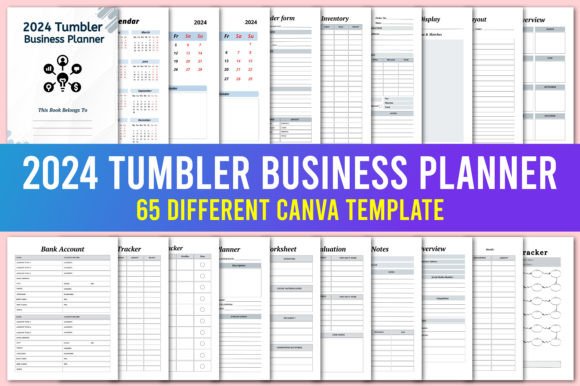
If you run a tumbler-making business—whether you sell glittery epoxy creations, sublimated travel mugs, or simple custom cups—you know that staying organized can quietly make or break your profitability. The Editable 2024 Tumbler Business Planner was designed exactly for this. It’s a complete set of Canva templates that gives you a done-for-you system to manage orders, inventory, finances, market prep, and customer follow-ups. Because it’s fully editable in a free Canva account, you aren’t locked into someone else’s idea of how your workflow should look. You can tweak layouts, change colors to match your brand, and add or remove pages without ever opening complex design software. And once you’ve personalized it, you can download high-quality print-ready PDFs or JPEG files to use on a tablet, print for a binder, or keep as a digital file on your phone.
A lot of new tumbler sellers overlook how quickly a hobby can snowball into a chaotic mess without the right paperwork. You might remember an order by a text message, scribble expenses on a sticky note, and guess at inventory right before a craft show. That approach works for a week or two, but eventually something falls through: a pre-order gets lost, you double-book a custom color, or you realize too late that you’ve been undercharging because you never tracked material costs properly. The planner solves that by giving you specific, interconnected forms that speak each other’s language. The Sales Log, Tumbler Order Form, and Stocks Inventory pages, for example, are meant to work side by side, so when you record a sale it’s easier to adjust stock count and flag low supplies. But simply owning the template doesn’t automatically fix the underlying mistakes people make when they set up their systems. Let’s walk through some of the most common missteps—and exactly how to avoid them—so your planner actually does the heavy lifting it’s supposed to do.
Overlooking the “Make a Copy” Step and Losing Your Editable Link
One of the most frustrating mistakes happens within the first few minutes of downloading. You receive the PDF with the Canva link, click it, and start editing directly on that shared template. Important note: To keep the original link active, please go to your Canva home and make sure you make a copy in your own account of the document and work on that one. If you don’t make a copy, you risk one of two problems. You might accidentally alter the master template that’s shared with other users, or you could lose access later if the link expires or is updated by the creator. You might spend hours customizing the Price List and Booth Layout only to find your changes gone.
This sounds minor, but it can affect your efficiency and even your presentation. Imagine handing a stall display inventory sheet to a helper at a market, and the categories are suddenly blank because you accidentally deleted embedded elements on the shared version. The better practice: as soon as you open the link, hit “Use template” or duplicate it into your own Canva home. Name it something obvious like “My 2024 Tumbler Planner” and maybe include the month or quarter. That single habit protects all your future edits and gives you a permanent personal version you can return to again and again. Then, whenever you’re ready to print or share, generate a fresh PDF or JPEG from that copy.
Editing Without a Clear Page Order Can Confuse Your Workflow
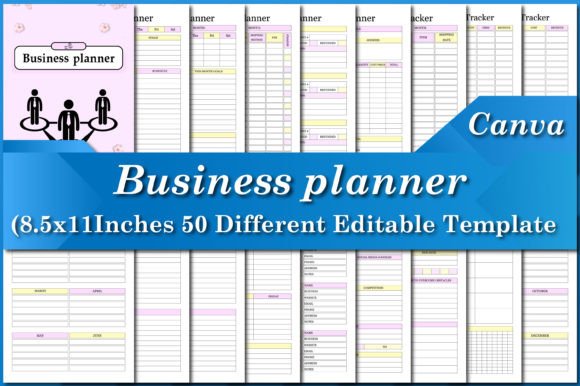
The planner comes with a robust checklist of pages – from Belongs To Pages, 2024 Calendar, and Monthly Planner all the way to Customer Follow-up List, Competitor Analysis, and Investment Tracker. That’s powerful, but it also invites a common error: people start rearranging, deleting, or duplicating pages without thinking about how they’ll actually use them day to day. A tumbler business has a natural rhythm. You might research products, order supplies, make items, photograph them, market, take pre-orders, package, deliver, and then track feedback and repeat customers. If you put the Spending Log after the Booth Layout or the Waiting List Sign Up before the Product Planner, you can lose the logical flow that saves you time.
Practical advice: before you move anything, flip through every page with your real week in mind. You likely want the Tumbler Order Form near the front for quick access, followed by an Order form or Pre-Order Sign Up Sheet for in-person events. Money-related sheets like Sales Log, Spending Log, Tax Deduction tracker, and Bank Account info often work well grouped together. The Calendar and Monthly Planner naturally belong at the beginning so you can quickly look at deadlines and market dates. By keeping related pages adjacent, you reduce the mental friction of jumping around. If you’re using the planner on a tablet while packing orders, you’ll appreciate not having to swipe through unrelated sheets to find the Packaging Inventory. A small amount of thoughtful arrangement early on makes the system feel effortless later.
Filling Out Forms in Isolation Instead of Linking Information
Many tumbler business owners treat each sheet like a standalone document. They’ll fill the Stocks Inventory without referencing the To Order list, or they’ll write a product display plan without consulting the Product Display page’s competitor notes. This creates a disjointed paper trail where the right hand doesn’t know what the left is doing. The result? You might order more blank tumblers because you forgot about the shipment that’s scheduled to arrive next week, or you’ll set up a booth that ignores a top-selling item because your competitor analysis page never fed into your market layout.
To avoid this, treat the planner as a single brain. For example, when you update the Stocks Inventory, keep the To Order sheet open beside it. If you drop below your minimum threshold for a particular tumbler size, immediately add it to To Order with the supplier name and estimated cost. Before a market, review the Customer Feedback and Show Products Research sheets side by side—was the matte black tumbler receiving more compliments than the glossy white one? That insight belongs in your Product Display plan. The planner also includes a Waiting List Sign Up. Use it not just to collect names but to feed your Purchase Tracker: if five people ask for a stainless steel coffee tumbler you don’t currently stock, that’s market research you can act on. Small connections like this stop your inventory from gathering dust and keep cash flowing.
Ignoring the Financial Pages Until Tax Season
A surprising number of small-batch sellers skip the Spending Log, Sales Log, Tax Deduction sheet, and Bank Account tracker throughout the year, only to scramble in March or April. The “I’ll enter it later” mentality often means lost receipts, forgotten material costs, and underreported deductions. With tumblers, even small purchases add up: epoxy resin, glitter, adhesive vinyl, sublimation ink, heat tape, protective packaging. If you aren’t logging expenses weekly, you’re likely paying more tax than necessary and you’re also working blind—you won’t truly know your profit margin on a custom tumbler if you’re guessing at supply costs.
A better approach: set a weekly ten-minute appointment with the planner’s Spending Log and Sales Log. Use the Spending Log for every receipt, whether it’s a bulk tumbler order, Etsy fees, or even the mileage to the post office (noted under Tax Deduction if applicable). The Sales Log isn’t just for large orders; enter every single transaction. At the end of the month, cross-check your Sales Log against your bank account or payment processor statements so nothing slips through. The Editable 2024 Tumbler Business Planner makes this simpler because you can type directly into Canva or print sheets and use a pouch system. If you do keep a physical binder, snap a photo of receipts and store them in a dated folder that matches the month on the Monthly Planner page. That one habit prevents the annual panic and gives you a clear picture of which markets and product lines actually make you money.
Underusing the Market-Specific Pages
Craft fair and market preparation is where many tumbler sellers burn time and lose sales. The planner includes a Countdown to Market, Booth Layout, Table Layout, Stall Display Inventory, Product Display, and even a Shopping List for last-minute items. The mistake is filling these out vaguely or not at all because “you already know what you’re doing.” The result is forgetting the tablecloths, bringing mismatched risers that hide half your stock, or having no system to track sales during the chaos of a busy event.
Practical correction: treat the Countdown to Market as a living checklist. Two weeks out, use the Shopping List for batteries, signage, cash float, and tape. One week out, finalize the Booth Layout sketch, adjusting based on which products you’re featuring that season. The Planner’s Booth Layout and Table Layout are fully editable, so you can drop in visual elements—rough shapes of shelves, risers, or a spinner rack—and share it with a helper. On market day, the Stall Display Inventory keeps you from leaving behind a banner or price cards. After the event, use the Sales Log to record what sold and compare it to your pre-show Stocks Inventory. Then feed that data into the Product Evaluation sheet. Did the new epoxy ocean tumbler sell out while the chrome decal one sat untouched? That’s your signal to shift displays and future purchasing. These pages aren’t busywork; they’re a direct feedback loop when used consistently.
Forgetting About Customer Retention and Follow-Up
Tumbler businesses often rely on repeat customers: a client who loved your work at a holiday market might come back for Mother’s Day gifts if they remember you. The planner gives you a Newsletter Subscribers list, Customer Follow-up List, Contact List, and Waiting List Sign Up. A common oversight is treating these like passive collections—you gather emails but never send a note, or you write down a follow-up intention but never look at the page again.
Avoid this by linking dates from your Monthly Planner. If someone signs up for a pre-order notification, jot down a follow-up date and a brief note on the Customer Follow-up List. When that date appears on your Monthly Planner, it’s your trigger. You might send a quick, friendly message: “Just letting you know I’ll be opening custom tumbler slots next Friday.” The Password Tracker also quietly helps retention by making it painless to log into your email marketing platform without resetting your password every time. If you find customer retention slipping, revisit the Customer Feedback page. Look for patterns—maybe your packaging was beautiful, so tell subscribers about your unboxing experience. Maybe people asked for easier straw cleaning, and you can mention you now include a brush. These small touches, supported by the planner, turn a one-time buyer into a loyal fan.
What to Check Before You Rely on the Planner
Before you make this your command center, there are a few sanity checks worth doing. First, browse Canva’s free image and element library if you plan to customize heavily. The templates are already professionally designed, but if you want to swap icons or add tumbler photos, make sure you’re using assets allowed for commercial use. Second, decide on your primary format: will you print, use it on an iPad with a stylus, or treat it purely as a digital PDF? That choice affects how you edit. If printing, confirm margins and bleed if your printer requires it—Canva has guides for that. If using digitally, consider flattening some layers or locking background elements so you don’t accidentally move them while typing on a touchscreen. Third, create a backup copy of your personalized version. Canva auto-saves, but exporting a PDF every month acts as a snapshot you can’t accidentally overwrite.
Finally, don’t try to use every single page on day one. Start with the core: Belongs To Pages, Calendar, Monthly Planner, Tumbler Order Form, Inventory Tracking, and Spending Log. Get comfortable. Then layer in the pre-order sheets, booth planning, and business idea scratch pads. The planner is modular by design, so it grows with your business without overwhelming you. Many tumbler sellers discover that certain pages, like the Affiliate Tracker or Donation Tracker, become more valuable once they start collaborating with influencers or donating to fundraisers. You aren’t locked in, and you can always make a fresh copy to experiment with a new layout without losing your tried-and-true version.
Used thoughtfully, the Editable 2024 Tumbler Business Planner shifts you from reactive scrambling to calm, clear-eyed operation. The editable Canva format gives you all the flexibility without a steep learning curve, and the specific pages address the real tasks you juggle—from the Instagram follower who wants a custom name decal to the wholesale inquiry that needs a polished Price List. The mistakes above are easy to make, but even easier to fix once you’re aware of them. Take a few minutes to set up your copy correctly, arrange pages for your natural workflow, connect information across sheets, and make the financial and planning pages a weekly habit. When your next market comes around, you’ll find that your booth looks sharper, your stock levels make sense, and your customers feel remembered—and your profits will reflect that quiet clarity.