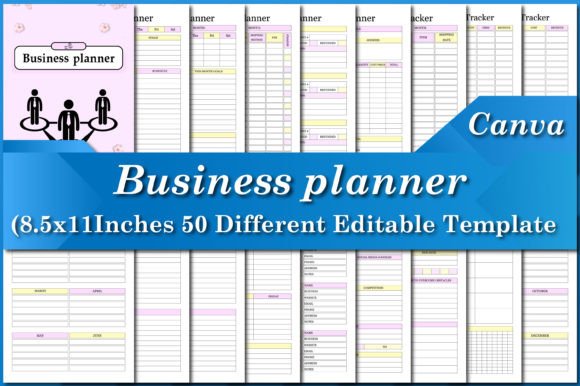
Organize Every Part of Your Business with Business Planner Canva Templates
Most small business owners know that feeling. You have orders coming in from three platforms, a social media campaign launching tomorrow, supplier invoices scattered across your inbox, and a growing sense that key numbers are slipping through the cracks. You do not need another generic notebook or a rigid spreadsheet that takes hours to update. You need a system that actually matches how your day runs—and a way to tailor it without starting from scratch. That is where Business Planner Canva Templates come in. They give you a complete suite of planning pages, all ready to customize, print, or use digitally, so you can finally see the whole picture of your business in one place.
Why a Unified Planner Matters for a Creative Business
Running a product-based or service-based venture today rarely means doing just one thing. Packing orders blends into updating inventory. Tracking ad spend overlaps with planning social posts. Even solo entrepreneurs wear a dozen hats before lunch. When you rely on separate apps, sticky notes, and memory, tasks fall behind. A unified planner—especially one you can adapt visually and functionally—becomes your central nervous system. The Business Planner Canva Templates collection is built exactly for that reality, putting sales tracking next to shipping logs, and goal actions beside daily to-do lists.
Instead of learning complicated software, you open a link, edit a few text boxes or colors to match your brand, and have a completely personal workbook. Because it sits inside Canva, you never need advanced design skills. Drag your logo into place, change a headline, or duplicate a page you use frequently. The result still looks polished and professional, not like a hastily assembled document.
What’s Actually Inside the Pack
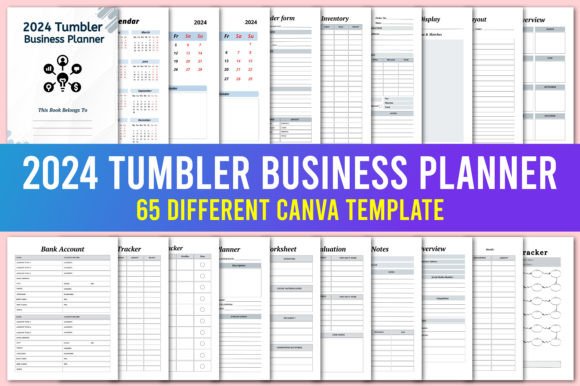
Many planner bundles feel bloated with filler pages you skip after week one. This one is different—it covers the real workflows that keep a business running day-to-day. Here is a sample of what you will find, each designed as a dedicated template:
- Daily, Weekly, and Monthly Planners – Capture immediate tasks, map out weeks, and get a macro view of deadlines.
- Order, Shipping, and Return Planners – Log every purchase, track packages sent, and monitor returns without losing information.
- Inventory Systems – Separate Product Inventory and Suppliers Inventory sheets let you know exactly what is in stock and what needs reordering.
- Financial Trackers – Income, expense, profit, and bill trackers give you a clear view of cash flow. The Profit Tracker helps you see which products or services actually drive your bottom line.
- Advertising and Campaign Logs – An Advertising Tracker, Campaign Tracker, and Online Statistics sheets let you record spend, impressions, and results across platforms so you can stop guessing what works.
- Social Media and Content Planning – A Social Media Planner and Post Planner plus a Password Tracker make consistent posting far less stressful.
- Goal and Action Breakdowns – Goal Action Plan and Business Action Plan templates bridge the gap between big visions and weekly steps.
- Contact and Supplier Management – Contact List, Supplier Contact List, and Supplier Calendar keep key relationships organized.
- Review and Evaluation – Monthly Review and Product Evaluation pages encourage regular reality checks on what deserves more energy.
- Quick Reference Sheets – To Do List, Checklist, Coupons Discounts, and Notes templates handle the small but essential planning moments.
This is not a random assortment. Every piece connects. You start the month with a Business Overview, populate a Monthly Calendar, track sales and shipments in real time, then end with a Monthly Review to refine your approach. The continuity is what turns isolated tasks into a coherent strategy.
Turning Plans into Familiar Daily Routines
On a Monday morning, you might open the Business Planner Canva Templates and print the Weekly Tracker plus a Shipping Planner because you know new orders will go out by Wednesday. Before the afternoon, you fill out an Income Tracker entry for a client payment, and note a supplier call on the Supplier Calendar. Because all pages share a consistent format, moving between them feels intuitive, not like switching between different systems.
For an Etsy seller, the combination of Orders Tracker, Return Tracker, and Product Inventory eliminates the frantic search through multiple email threads when a customer asks about a replacement. For a freelance marketer, Campaign Tracker and Online Statistics replace messy spreadsheets, making client reporting far faster. For a blogger who sells digital products, the Social Media Planner and Post Planner work alongside the Advertising Tracker to build content calendars that tie directly to sales events.
Seamless Customization Without Design Headaches
One of the biggest reasons business owners abandon planners is an inability to change them. Pre-printed planners force you into someone else’s categories. With the editable Canva link provided, you have full control. You can delete a page you never use, add a section for a new product line, or swap colors to match seasonal branding. Need an extra Order Form? Duplicate it. Want your logo on every Daily Planner? Add it once and apply across pages.
This flexibility extends to language and emphasis. If you call clients “customers,” you can rename headings accordingly. If you track inventory by SKU and location, you have the space to build that into the Product Inventory template. The files are not locked PDFs with stale fields; they are starting points you reshape.
Print-Ready Quality That Works for KDP and Beyond
Perhaps you want a physical planner to keep on your desk or even to sell on Amazon KDP. Every template comes tested on Amazon KDP and meets professional print standards: size 8.5 × 11 inches with bleed, CMYK color, and 300 DPI. You receive a high-quality ready-to-upload PDF file that prints cleanly without blurry text or cut-off edges. Because the bleed is included, you do not need to fiddle with margin adjustments last minute.
For those who simply want a home-office binder, you can print pages as needed, hole-punch them, and build a custom planner that evolves with your business. The 300 DPI ensures that even detailed tracker grids look crisp. Whether you use a home laser printer or a professional print shop, the output stays sharp.
How Real Businesses Use These Pages Together
Consider a small handmade candle company. They start each quarter with the Goal Action Plan to set production targets and a marketing budget. Each week, the Orders Tracker logs sales from their website and wholesale accounts. As ingredients run low, the Suppliers Inventory and Supplier Contact List make restocking efficient. Meanwhile, the Social Media Planner maps out product launch posts, and the Advertising Tracker monitors Facebook ad spend. At month’s end, the Profit Tracker reveals whether the new scent was worth the increased ad budget.
Now picture a freelance web designer. They rely heavily on the Contact List and Password Tracker to log client logins. The To Do List and Weekly Tracker break project milestones into manageable chunks. The Income Tracker and Expense Tracker simplify tax preparation, while the Business Overview page helps during quarterly reviews with their accountant.
These scenarios share a common thread: the planner becomes less of a chore and more of a dashboard. Because the information sits in one place, patterns become visible. You might notice shipping costs spike in certain months, prompting a rethink of carriers using the Shipping Tracker. Or you might see that a specific coupon code in the Coupons Discounts tracker consistently brings in first-time buyers, which justifies a permanent discount link.
Clarity Through Tracking, Not Just Planning
Planning is only half the equation. Documenting what actually happens gives you leverage. The Bill Tracker prevents missed due dates and late fees. The Return Tracker highlights product quality issues before they become widespread complaints. The Online Statistics sheet captures website or social media data that informs future content decisions. Even the simple Checklist templates can serve as a morning startup routine, making sure you never skip forgottable steps like replying to customer emails or backing up files.
What Sets These Templates Apart for Long-Term Use
Many business planning tools require a monthly subscription or lock you into an ecosystem that may disappear. These templates are a one-time acquisition. You own the files. You can store the editable Canva link in your account and revisit it years later to tweak a page or add a new section. There are no recurring fees, no feature limits, and no forced updates that break your layout.
Additionally, the inclusion of often-overlooked pages like Product Evaluation, Supplier Calendar, and Monthly Review signals an understanding that good business management is reflective. It is easy to stay busy without ever pausing to assess what is actually profitable. These pages create a built-in rhythm of evaluation that many entrepreneurs skip until a crisis forces it.
The sheer variety—over 50 distinct template designs—means you are not expected to use every single one. Pick the set that fits your current stage. A startup might focus on Business Action Plan, To Do List, and Expense Tracker. A scaling business might prioritize Campaign Tracker, Product Inventory, and Profit Tracker. The flexibility respects where you stand today while leaving room to grow.
Getting Started Without Overwhelm
When you first open the Business Planner Canva Templates file, resist the urge to personalize every page at once. Start with the three trackers that currently cause the most friction. If you are losing track of orders, begin with Orders Tracker and Return Tracker. If your financial picture is foggy, prioritize Income Tracker and Expense Tracker. Print those, use them for a week, then add more layers. Because each page works independently, you build momentum naturally without a steep learning curve.
The editable Canva link lets you adjust as your confidence grows. Maybe you initially set up a simple Monthly Review with just a few prompts. Later, you expand it to include revenue breakdowns and content performance. The template grows along with your business, which rarely happens with off-the-shelf planners.
For those who prefer a fully digital workflow, you can use the pages directly in Canva, filling fields on a tablet or laptop. For tactile planners, the print-ready PDF delivers a binder-ready solution. This hybrid flexibility matters because how you plan often shifts with your workload and season.
A Practical Tool for the Real Side of Entrepreneurship
Entrepreneurship is not always glamorous. It involves tracking which supplier sent a late shipment and remembering that you edited a password last month. The Business Planner Canva Templates respect that reality by giving equal weight to big-picture vision pages and detail-oriented logs like Password Tracker or Shipping Tracker. Every template serves a genuine function, and you can shape them to sound like your brand, not a generic template vendor.
When you can see your sales data next to your social media calendar, and your inventory alerts adjacent to your monthly goals, decision-making speeds up. You spend less time hunting for information and more time acting on it. That shift—from reactive scrambling to proactive management—is the real value packed into these pages. And because the file includes a print-ready PDF alongside the editable link, you can move from screen to paper in moments, keeping your business moving however you work best.