Unlocking the Potential of Truck Driver Logbook KDP Interiors: Your Blueprint for Self-Publishing Success
Creating and selling books on Amazon’s Kindle Direct Publishing (KDP) platform has transformed the way entrepreneurs and creatives build income streams. Among the most profitable and evergreen niches is the world of low-content books—journals, planners, and logbooks that serve practical, everyday needs. One standout product type is the truck driver logbook, a specialized tool that helps professional drivers comply with regulations, track hours, and maintain organized records. To publish these effectively, you need a high-quality Truck Driver Logbook KDP Interior. This article explores everything you need to know about this interior design asset: what it is, why it matters, how to use it, and how to avoid common pitfalls while building a reputable publishing business.
What Is a Truck Driver Logbook KDP Interior?
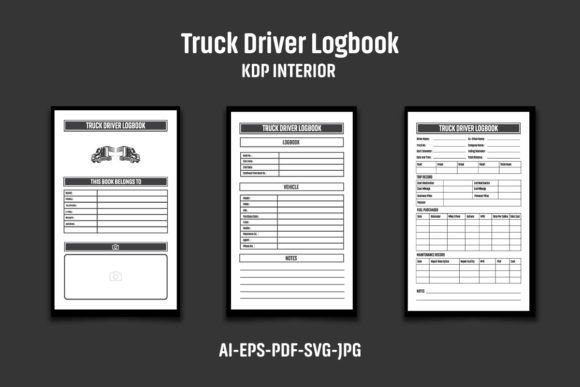
At its core, a KDP interior is the formatted, print-ready file that becomes the inner pages of your paperback book. A Truck Driver Logbook KDP Interior is specifically designed for truck driver daily logs, trip summaries, vehicle inspection reports, and mileage tracking. The interior you purchase often includes multiple file formats—AI, EPS, PDF, JPG, SVG—allowing you to customize and upload exactly what Amazon requires.
Think of it as a pre-structured canvas. You don’t need to design tables, columns, or professional layouts from scratch; the interior provides a polished foundation that you can modify. The product described here is an ideal starting point, featuring a clean 8.5″ x 11″ bleed design, 120 pages, and 300 DPI high-resolution black-and-white artwork. The inclusion of bleed (with overall dimensions of 8.62 x 11.25 inches) ensures that your final printed book has edge-to-edge printing where needed, a critical detail for a professional look.
Why Choose a Dedicated Truck Driver Logbook Interior?
Publishers often assume that any generic journal interior will suffice, but logbooks for truck drivers have specific regulatory and usability needs. A properly formatted interior must include clear fields for date, starting and ending odometer readings, carrier information, vehicle identification, duty status changes, and total hours. A dedicated truck driver logbook interior already incorporates these sections with intuitive spacing and logical flow.
Using a purpose-built interior saves hours of design guesswork. It also lets you focus on what makes your version unique: cover design, subtle branding, or added bonus sections like expense tracking or trip routing notes. When you start with a proven layout, you reduce the risk of formatting errors that can lead to rejected proofs or, worse, negative customer reviews because the logbook doesn’t meet practical needs.
Key Features of the Truck Driver Logbook KDP Interior
Understanding the technical specifications of your interior file is essential for seamless publishing. Here’s a breakdown of what you get with this particular product and why each element matters:
- Multiple File Formats: 1 AI File, 1 EPS File, 1 PDF File, 3 JPG Files, 1 SVG File. This variety lets you work in Adobe Illustrator, CorelDRAW, Inkscape, or even simpler programs. You can resave, tweak, and export exactly what Amazon requires (usually a PDF/X-1a file).
- Paperback-Ready Dimensions: Interior pages sized at 8.5″x11″ with bleed, resulting in an overall file size of 8.62 x 11.25 inches. This matches the industry-standard large format that truckers prefer for writing comfortably in a moving vehicle.
- 120 Pages: A balanced page count that provides enough daily logs for several months without making the book too bulky or expensive to print. KDP’s royalty structure often makes 120 pages a sweet spot for pricing and profit.
- Black and White Interior: Designed for cost-effective printing. Black-and-white interiors keep manufacturing costs low, maximizing your royalty margin. The high-resolution 300 DPI ensures that even small text or fine lines print with crisp clarity.
- Easy Color Change Capability: The interior files are structured so you can quickly alter any color elements to match your brand or customer preference. Many trucking companies have branded logbooks, and this flexibility allows you to serve that B2B niche without starting from zero.
- AI and EPS CS6 Compatibility: The source files are compatible with Adobe Illustrator CS6 and newer, making them accessible even if you haven’t upgraded to the latest software.
These features combine to give you a production-ready asset that significantly speeds up your time to market. Instead of spending days designing, you can have a finished interior customized and uploaded within hours.
How to Properly Customize and Use Your KDP Interior
One of the most common misunderstandings newcomers have is that they can simply download an interior file and upload it straight to KDP. This is risky. Amazon actively scans for duplicate content, and if your book’s interior matches another seller’s exactly, you could face account warnings or even suspension. To build a sustainable business, you must personalize the file.
Step-by-Step Customization Guide
- Extract the ZIP File: All files arrive compressed. Use WinZIP, WinRAR, or your operating system’s built-in extractor. Just right-click the ZIP folder and select “Extract All.” You’ll then have access to each individual file format.
- Open the Editable Source File: If you have vector editing software like Adobe Illustrator, open the AI or EPS file. If not, you can use the SVG in free programs like Inkscape. The PDF can sometimes be edited in certain software but is less flexible for significant changes.
- Add Your Branding or Logo: This is the most critical step. Place a small, unobtrusive logo, your publishing name, or a subtle decorative element on each page—often in the footer or header area. Even a simple text footer with “© Your Brand Name” or a page number style that’s uniquely yours can make a huge difference. This transforms the interior from a generic template into your original creation.
- Adjust Colors or Typography (Optional): Because the files support easy color changes, you might want to tint table lines in navy blue instead of pure black, or adjust font styles if your logbook targets a specific demographic. Keep readability in mind; truck drivers often work in low-light conditions, so high-contrast designs are best.
- Check the Bleed Settings: Ensure that any backgrounds or line work that you want to reach the edge of the page actually extends to the bleed margin (0.125 inches on all sides). The provided file already accounts for this, but if you add elements, verify they don’t disrupt the layout.
- Export a Print-Ready PDF: From your editing software, export a PDF that meets KDP’s specifications. Typically, this is a PDF/X-1a:2001 with fonts embedded and the correct trim size. Double-check that the final page count is still 120—sometimes editing can accidentally add or remove pages.
The Business Case: Why Truck Driver Logbooks Sell
To fully appreciate the Truck Driver Logbook KDP Interior, it’s helpful to understand the market demand. Commercial truck driving is a massive industry with millions of drivers in the United States alone. Regulations require drivers to maintain accurate records of duty status (often referred to as HOS—hours of service). While electronic logging devices are on the rise, many independent drivers and smaller fleets still rely on paper logbooks as a backup or primary method. Furthermore, even drivers who use electronic logs often appreciate a physical planner for trip planning, expense notation, and fuel tax records.
This creates a consistent, long-tail demand. A well-designed logbook interior allows you to publish a book that meets these needs while enabling you to sell at a competitive price. Because low-content books typically have lower price points ($6.99–$12.99), the volume potential across multiple variations—different covers, branding, or additional sections—can lead to a solid passive income.
Avoiding Common Pitfalls and Misunderstandings
Even experienced publishers can stumble when using KDP interior templates. Let’s clear up some key points:
- “I can’t just upload the file as-is.” This is the number one mistake. As noted earlier, duplicate content detection is strict. Always add your own logo, graphic, or unique element. The product notes explicitly remind you to do this before uploading. Treat the interior as a starting foundation, not the finished product.
- “The images, text, and mockups in the product listing are not included.” Sellers often use attractive cover mockups for presentation. Remember that you are buying the interior page files, not a ready-made cover or promotional images. You will need to design your own cover using Amazon’s cover creator or separate software.
- “Bleed is confusing.” The interior has an overall dimension larger than the trim size because of bleed. When you upload the PDF to KDP, the system trims the edges to the designated 8.5″x11″. Elements that sit near the edge must extend into the bleed zone to avoid white slivers after trimming. The provided file already does this, but if you reposition anything, be mindful of safe zones.
- “120 pages is all I get?” Some publishers worry about scaling the interior up to 150 or 200 pages. While the core file is 120 pages, you can often duplicate page groups in your editing software to increase the page count, provided the layout remains consistent. However, 120 pages is a strong market standard, so starting with that is perfectly acceptable.
Integrating This Interior into a Larger Publishing Strategy
Low-content publishing thrives on volume and niche targeting. The truck driver logbook interior can serve as the anchor product for a series. Imagine creating variants such as:
- Truck Driver Daily Log Book & Vehicle Inspection Report
- Fuel Mileage Log for Truckers
- Owner-Operator Expense and Trip Tracker
- Student Truck Driver Training Log Book
Because the base interior is so flexible, you can tweak headings or add a few bonus pages to create multiple listings from the same core design file. This not only diversifies your catalog but also establishes you as a go-to brand in the trucking niche. Over time, you could even bundle digital products like a matching cover template to sell to other KDP creators, building another income layer.
Technical Quality and Why It Matters for KDP Success
When you hold a physical copy of your book, the print quality must reflect professionalism. The 300 DPI resolution of this interior guarantees that even the smallest text—like tiny grid numbers or legal disclaimers—stays legible. The black-and-white format is optimized for KDP’s print-on-demand technology, which often has specific requirements for color profiles and ink density. Using a professionally crafted file reduces the chance of your book failing KDP’s automated print checks.
Additionally, the inclusion of AI and EPS vector formats means you can resize elements without loss of quality. If you ever wanted to adapt the interior for a different trim size (say, 6″x9″), the vector nature allows you to scale everything precisely—a huge advantage over raster-only interiors.
Building an E-E-A-T Compliant Publishing Brand
From an SEO and trust standpoint, Google’s E-E-A-T guidelines (Experience, Expertise, Authoritativeness, Trustworthiness) apply to content about publishing just as they do to any other niche. By writing clear, helpful descriptions and by creating genuinely useful logbooks that drivers rely on, you build a reputation. The Truck Driver Logbook KDP Interior empowers you to deliver a product that demonstrates an understanding of the trucking profession. Consider including a brief “How to Use This Logbook” guide in the first few pages, or tips for staying compliant with FMCSA rules. This extra touch signals expertise and care, which can lead to positive reviews and repeat buyers.
Furthermore, always abide by Amazon’s Terms of Service. The product note emphasizes creating your own interior. This is not just a safeguard against duplicate content; it’s about maintaining a healthy marketplace where originality is valued. When you invest a little time in personalization, you stand out and attract a loyal customer base.
Conclusion: Your Path to a Streamlined Publishing Workflow
The Truck Driver Logbook KDP Interior is far more than a simple template—it’s a strategic tool that removes the heavy lifting from logbook creation while giving you full creative control. With its versatile file formats, production-ready dimensions, and crisp 300 DPI artwork, it perfectly balances professional design with ease of use. Whether you’re a seasoned KDP publisher expanding your low-content catalog or a beginner taking your first step into the self-publishing world, this interior helps you publish a high-demand product quickly and confidently.
By understanding how to extract, customize, and upload these files, and by respecting the need to inject your own branding, you transform a foundational asset into a profitable listing. The trucking industry will always need organized record-keeping, and your logbook can become an indispensable companion for thousands of drivers. Grab the files, add your unique touch, and build a business that runs as reliably as the trucks your books will sit in.