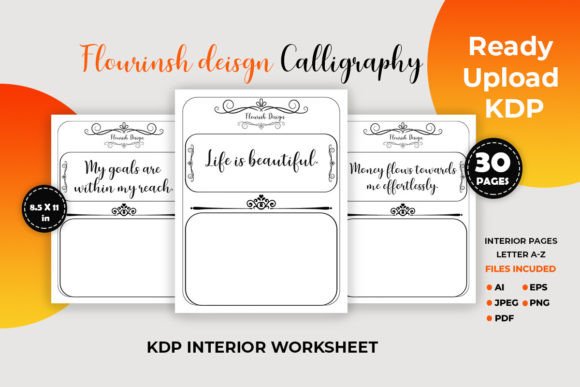
Flourish Design Calligraphy Pages
Flourish Design Calligraphy Pages provide a structured set of 30 practice sheets designed to help you build consistency, control, and creative confidence in hand lettering. These files are delivered in multiple formats—PDF, JPEG, AI, and EPS—all at 300 DPI, so you can print them for physical tracing or import them into Procreate for iPad practice. Because the pages focus specifically on flourishes, they fill a common gap in self-directed calligraphy learning: the need for repetitive, graceful movement drills that move beyond basic alphabets.
Unlike a generic handwriting workbook, these sheets treat flourishes not as decorative afterthoughts but as core design elements. You trace swooping entry strokes, looped crossbars, ornamental tails, and balanced compound curves repeatedly until your muscle memory starts to anticipate flow rather than forcing it. This makes the product useful both for complete beginners who want guided materials and for intermediate lettering artists who recognize that a few minutes of targeted flourish warm-up can dramatically improve polished projects.
Where Flourish Design Calligraphy Pages Fit Into Your Creative Workflow
Most people encounter flourish practice at a single moment: when a project is due and their lettering feels stiff. But these sheets work best when they become a small, embedded part of your regular creative process. Before you sit down to address envelopes, sketch a logo, or design a book cover, running through two or three pages of Flourish Design Calligraphy Pages acts as a warm-up that syncs hand pressure, nib angle (or stylus tilt), and breathing rhythm.
During a longer project, you might pull up the PDF on your tablet and isolate one specific flourish shape that’s giving you trouble. Instead of wasting good paper stock, you practice the troublesome loop or crossed terminal on the digital template, then immediately apply it to your live work. After completing a client piece, returning to these sheets for a comparative self-check helps you spot drift in slant or stroke weight over time. The flow is not linear—some days you’ll use the pages for exploration, other days for correction.
Preparing Your Workspace for Physical or Digital Practice
The immediate value of Flourish Design Calligraphy Pages depends on how easily you can start using them. If you’re printing, open the high-resolution PDF and send it to a laser or inkjet printer at 100% scale on smooth, uncoated paper—preferably 32 lb bond or marker paper that resists bleeding. Keep a stack of pre-printed sheets in a clipboard or a ring binder so they’re accessible with zero friction. Consistent paper quality matters because you will trace each page multiple times to build muscle memory; if the surface changes, your nib or brush pen response changes too.
For digital use on an iPad, import the JPEG or PDF files into the Procreate app. Create a new canvas at 2550 x 3300 pixels (that’s 8.5 x 11 inches at 300 DPI) and add the practice sheet as a reference layer on top with reduced opacity. Alternatively, open the PDF directly in a compatible document viewer or import it into a note-taking app that supports layer locking. The EPS and AI formats are less about daily practice and more about later customization—you can open the vector outlines in Affinity Designer or Adobe Illustrator to alter the stroke shapes, extract individual elements for your own design templates, or prepare a KDP-ready workbook cover that matches your brand.
Getting the Most Out of Each Drill Page
Tracing may sound mechanical, but how you trace changes everything. Start with a rhythmic approach: breathe out on the downstroke, breathe in as you lift into a hairline. The Flourish Design Calligraphy Pages are dense with continuous line exercises that force you to maintain even pressure across extended curves. When you first trace a page, use a pencil or a medium-tipped brush pen and concentrate only on matching the centerline of each flourish. Don’t worry about line variation yet.
Once the path feels familiar, switch to a flexible nib or a pressure-sensitive Procreate brush. At this stage, your goal shifts from accuracy to nuance. Pay attention to where the template thickens and thins. Overlay your second attempt directly on top of the first (digitally, you can duplicate layers) and identify spots where you consistently overshoot or compress a curve. After about four tracing sessions, take a blank sheet and attempt the same flourish forms without the guide underneath—this video-game-like progression from “easy mode” guided tracing to freehand recall builds real skill faster than weeks of unsupervised doodling.
Blending Physical and Digital Practice for Balanced Improvement
Relying solely on digital practice has a hidden cost: you lose the haptic feedback of different papers, inks, and nib pressures. The reverse is also true; you miss the rapid iteration that digital layers allow. A productive mix might involve printing the PDF for morning drills using traditional pointed pen or brush markers, then repeating the same sheet in Procreate during a lunch break, focusing specifically on areas that felt shaky on paper.
When you practice digitally, take advantage of Procreate’s QuickShape and streamline sliders to sharpen your eye for smooth curves. But turn off these aids periodically to check whether your hand has truly internalized the motion. The AI and EPS files become useful here if you want to create a custom “challenge sheet”: copy a particularly difficult flourish from the vector file, rotate it, scale it, and arrange it in a new pattern. Practicing flourishes in unfamiliar orientations forces your brain to process the shape as a whole, not just as a memorized hand sequence.
Applying Flourish Skills to Real Creative Projects
The practical payoff of consistent practice with Flourish Design Calligraphy Pages appears in small, everyday design decisions. You’ll notice more confident stroke endings when you write a gift tag or a name card. Professionals who create wedding stationery, signage, or social media templates will find that the ability to extend an ascender into a controlled flourish without distorting the letterform sets their work apart from quick-tool effects.
Small business owners often handle their own branding and packaging. A practiced flourish applied to a product tag, a thank-you card, or an Instagram quote graphic adds a personal, handcrafted signal that generic typefaces cannot replicate. Designers who prepare KDP interiors can use the vector files to generate ruled practice books or journal inserts; the AI and EPS formats are already compatible with layout software, so you can integrate selected flourish elements into a cover design quickly without redrawing. This turns the practice sheets from a purely personal tool into a reusable design asset.
Organizing Practice Sessions and Tracking Progress Over Weeks
Improvement becomes visible only when you organize your output. Without a simple system, a month of casual practice can blur into a vague feeling of “maybe I’m better.” Adopt a habit of dating each physical sheet and storing them in a folder chronologically. Every two weeks, pull out the oldest and newest sheets for the same flourish page and compare stroke confidence. You will see subtle gains in line smoothness, consistency of slant, and the natural taper at stroke beginnings and endings.
Digital practice makes comparison even easier. In Procreate, group your practice layers into stacks by week. Turn on the time-lapse recording before starting a session; watching the replay often reveals unnecessary micro-adjustments and hesitations that you don’t perceive in real time. These insights directly inform your next practice round. If a particular crossbar flourish or cascading loop continues to resist improvement, dedicate three consecutive sessions just to that single line across multiple template pages until it breaks.
Long-Term Use and Building a Personal Calligraphy Asset Library
After you have internalized the foundational flourish shapes, the original Flourish Design Calligraphy Pages files remain valuable. Use the vector versions to create your own warm-up sheets tailored to the exact letter combinations that appear most in your recurring projects. Extract the cleanest flourish components and save them as individual SVG or brush stamp files in your design app—this allows rapid prototyping of invitations or logos where you need a polished decorative element but want to place it precisely without redrawing every time.
The 30-page set also functions as a style reference. When you need to communicate a specific lettering mood to a client or a collaborator, pull up the AI file and point to the flourish variants that match the brand tone—airy and open curves for a minimal skincare brand, tight and intricate spirals for a luxury hospitality project. In this way, the product shifts from a static workbook to an ongoing toolkit that supports both skill development and professional output. The multiple download formats ensure the content works across any workflow, whether that’s a completely analog studio, a paperless iPad setup, or a hybrid where vector editing meets hand-pulled prints.
Practical Considerations for Consistent Daily Use
Even the best practice material won’t help if it’s buried in a downloads folder. Create a dedicated folder on your tablet home screen or keep a printed stack within arm’s reach of your desk. Tie practice to an existing daily trigger—right after pouring morning coffee, for instance, or during the first five minutes of a lunch break. You don’t need long sessions; twelve minutes of focused trace-and-compare work with Flourish Design Calligraphy Pages reliably outperforms an hour of distracted freeform lettering.
Pay attention to compatibility details: if you print the sheets and use them with a light pad underneath, you can place a fresh sheet of marker paper on top for ghost-tracing without damaging the original print. If you use a stylus on a screen, apply a matte screen protector to mimic paper tooth; this reduces the glassy slip that often leads to wobbly digital strokes. Whether you plan to publish a KDP workbook of your own, create custom wedding stationery, or simply find a calming creative habit, treating these pages as a repeatable unit of deliberate practice—rather than a one-time activity—makes the difference between admiring calligraphy and actually doing it.
Beyond the drills, the product’s ready-to-upload KDP formatting opens a parallel opportunity for entrepreneurs and publishers who want to create their own calligraphy workbook for sale. By modifying the AI or EPS files, you can add your own lettering examples, adjust the layout, and produce a unique book that teaches flourish techniques under your brand. This extends the product’s lifecycle from a learning tool into a commercial template asset, which is a helpful secondary path for creative business owners looking to monetize their lettering expertise.