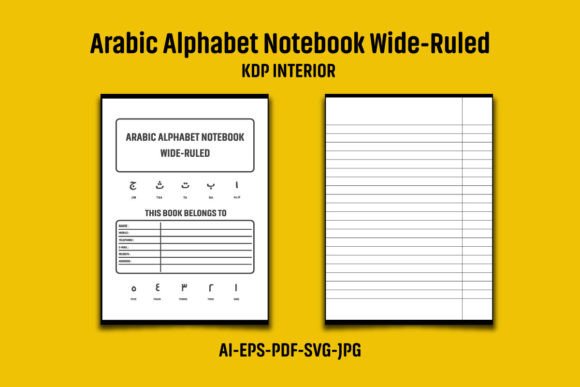
Arabic Alphabet Notebook Wide-Ruled KDP
Creating a paperback notebook for Arabic learners seems straightforward: pick a theme, buy an interior file, and upload. The Arabic Alphabet Notebook Wide-Ruled KDP interior offers a shortcut — pre-designed pages formatted for 8.5″x11″ with bleed, ready to drop into your project. Many first-time self-publishers assume that purchasing such a file means they’re done. They upload the PDF straight to KDP and wait for sales. That approach can trigger duplicate content flags, limit branding opportunities, and sometimes result in a book that looks unpolished to buyers who compare products on Amazon.
Understanding what you’re actually getting with this interior — and what you still need to do — separates a forgettable low-content book from one that feels intentional and useful. Let’s walk through the product details first, then dig into the mistakes that trip up even experienced creators.
What Exactly Is the Arabic Alphabet Notebook Wide-Ruled KDP Interior?
This is not a printed book you hold in your hands. It’s a collection of digital files — AI, EPS, PDF, JPG, SVG — that make up the internal pages of a notebook dedicated to practicing Arabic letters. The key specs are consistent with standard KDP requirements: 8.5″x11″ design with bleed, actual overall dimensions of 8.62″ x 11.25″, 120 pages in black and white, high resolution at 300 DPI. The wide-ruled lines give plenty of room for tracing and writing each letter of the Arabic alphabet. The black-and-white format keeps printing costs minimal, which is a practical factor for selling on Amazon where color interior books cost significantly more to print.
Creators buy this interior to avoid designing from scratch. They might be language teachers, homeschooling parents branching into publishing, or entrepreneurs building a catalogue of niche educational notebooks. The promise is a shortcut to a professional-looking product without needing Adobe Illustrator expertise or hours in InDesign.
Overlooking the Customization Requirement
The most common stumble happens right after download. The product description explicitly states: “Please add your logo or graphic to the Interior page before uploading to KDP to prevent any flags for duplicate content.” Many users skip this step, believing a minor tweak is enough — changing the file name, re-saving the PDF, or adding a single word on the first page. Amazon’s systems are sophisticated. They compare interior files across submissions. If your 120-page block matches another seller’s interior byte-for-byte, your book may be flagged, delayed, or blocked.
The fix isn’t difficult, but it requires intentional changes. Add your logo to every page, not just the title page. Place a subtle copyright notice, your brand name, or a small decorative element that ties the notebook’s theme together. If you’re comfortable with design software, tweak the header or footer line weight, or add a faint watermark in a margin. These adjustments don’t detract from the wide-ruled practice sheets — the primary function remains untouched — but they create a unique digital fingerprint. A buyer who compares two similar notebooks will favor the one that feels cohesive rather than generic.
Misunderstanding Bleed and Trim Dimensions
The interior comes with proper bleed: 0.125 inches beyond the 8.5″x11″ trim area, leading to overall dimensions of 8.62″ x 11.25″. That bleed exists so background elements extend to the edge of the page after trimming, preventing white slivers on a printed book. The mistake is assuming that the PDF you download is a “set it and forget it” file that will print perfectly no matter what. When you open the file in a viewer, you might not see the bleed area because it’s outside the visible page box. If you then make edits — resizing elements, adding your logo — and you don’t preserve the bleed box, or you export without bleed, the final uploaded PDF will be rejected by KDP’s automated checker.
Before uploading, open the PDF in Adobe Acrobat (or any professional tool) and inspect the Page Box settings. Ensure the trim box matches 8.5″x11″ and the bleed box extends exactly 0.125 inches on all sides. When exporting your edited interior, select the option to include bleed if your software supports it. A quick test: upload to KDP and launch the online previewer. Flip through pages and look for thin white lines near the edges. Catching layout issues at this stage saves days of back-and-forth with KDP support.
Ignoring the Difference Between File Formats
The product bundle includes AI, EPS, PDF, JPG, and SVG files. This variety is generous, but it can cause confusion. Some buyers open the JPG in a simple editor, add text, and re-save — degrading quality. JPG compression artifacts reduce sharpness, and if you resave multiple times, the 300 DPI advantage disappears, leaving blurry lines. The PDF is the ready-to-upload file, but it’s intended as-is or for minimal annotation, not heavy editing. For adding logos or customizing, the AI (Adobe Illustrator) or EPS files are your best starting points. They preserve vector lines, ensuring the wide-ruled structure and Arabic letter headers scale cleanly.
If you don’t own Illustrator, use Inkscape (free) or Affinity Designer to work with the SVG or EPS files. Edit the vector layers, then export a new high-resolution PDF with bleed settings intact. This workflow keeps lines crisp and professional, whether you’re printing a single proof copy or scaling up for bulk sales.
Avoiding Repetitive Content and Poor User Experience
A notebook interior that’s entirely populated with identical practice sheets might serve a function, but learners who actually use the Arabic Alphabet Notebook seek variety. They want letter-by-letter focus, maybe with arrows showing stroke order, or sections that increase in complexity. Buying a single interior file often means you get a uniform 120-page layout. That can be fine for absolute beginners who simply need repetition. But if your target audience includes intermediate learners or adults who want structured practice, consider combining this interior with supplementary pages — perhaps progressive drills, common word formation grids, or a few blank pages at the end for freehand practice.
You can build those pages yourself or purchase additional compatible interiors. The key is to sequence them meaningfully inside the book. A table of contents or simple dividers (page headings like “Week 1: Isolated Letters”, “Week 2: Connected Forms”) instantly raise the perceived value. Buyers scanning the Look Inside feature on Amazon will notice the extra effort and are more likely to purchase over a competitor’s plain repeating notebook.
Forgetting About Print-Ready Colors and Readability
The interior is deliberately black and white. Yet some creators, in an effort to personalize, add gray text or light lines that look legible on screen but print poorly. Standard KDP black-and-white printing uses digital printers that can render thin gray lines as broken or faint. Always check that your added elements are deep black (#000000) or at least 90% K in CMYK. For the wide-ruled lines, resist the temptation to lighten them below 70% black — the paper absorbs ink, and fine lines may become hard to see for someone tracing letters. Test prints on your home laser printer can approximate the final output, though ordering a physical proof copy through KDP is the most reliable check.
Assuming the Interior Solves the Cover and Metadata Problem
An Arabic Alphabet Notebook Wide-Ruled KDP interior is only half the book. Creators sometimes spend hours perfecting the inside and rush through the cover design and keyword strategy. A bland cover with mismatched typography signals low quality, even if the interior is flawless. Since you’re targeting language learners, use clear, attractive Arabic lettering on the cover, perhaps with a subtitle in English describing the wide-ruled format. Ensure the cover’s spine text (if applicable) and back cover description address the user’s desire: effortless repetition, clear guides, comfortable spacing.
Similarly, the search terms and categories matter. Don’t just put “Arabic notebook” — include specific terms like “Arabic alphabet practice”, “wide ruled tracing book”, “learn to write Arabic”, and “adult Arabic handwriting”. These terms help the right audience find your book without competing against tens of thousands of generic notebooks.
Neglecting the ZIP Extraction Step
It might seem trivial, but a number of negative reviews for digital products stem from the buyer not extracting the ZIP file properly. The product is delivered as a compressed ZIP containing multiple file types. Attempting to open the PDF directly from within the ZIP viewer can cause corrupted fonts or missing bleed information. Always extract the entire folder to a local hard drive before doing anything. Use the built-in extraction tool on your operating system, or utilities like WinRAR or 7-Zip. Once extracted, verify you have all components: AI, EPS, PDF, JPG, and SVG. If any are missing, contact the seller before you spend hours editing.
Planning Beyond a Single Notebook
One mistake that limits long-term KDP growth is treating each interior as a standalone project. If you invest time customizing the Arabic Alphabet Notebook Wide-Ruled KDP interior, you can repurpose the same structure for other scripts — think Persian, Urdu, or even Hebrew letter practice. The wide-ruled layout serves any writing system that benefits from large, clear guidelines. Save your customized template (after removing Arabic-specific elements) so that future notebooks take minutes to adapt, not hours. That scalability turns a $10 interior purchase into a reusable asset.
Matching Audience Expectations with the Right Interior Choice
Before purchasing any KDP interior, including this one, ask: Is 120 pages too few or too many? Wide-ruled lines suit beginners and those with visual comfort needs, but advanced learners writing connected sentences might prefer college-ruled or dot grid. The 8.5″x11″ size is standard, but if your target market uses A4 paper primarily, the product may feel slightly off. Check your geographic targeting on Amazon. Small mismatches in sizing expectations lead to returns or lower ratings. If you’re unsure, look at competing books: do they use this same size? Are reviews mentioning “too large” or “perfect for tracing”? That research can prevent you from sinking time into an interior that doesn’t resonate.
Final Steps Before Hitting Publish
Once you’ve customized the interior with your logo, ensured bleed and 300 DPI are intact, and assembled a proper cover, take these pragmatic steps: open the final PDF and scroll every page. Is the numbering consistent? Are all Arabic letter headers spelled correctly? Run a spelling check on any added text. Then view the interior in KDP’s digital proof at 100% zoom. Look for pixelation, misaligned margins, or elements bumping against the trim edge. Order a physical proof if you can — the actual paper feel and ink density can differ from a digital representation. After you approve the proof, go live. But don’t stop there. Monitor the first few sales and read customer comments for feedback on line spacing, page thickness, or additional letter forms they wish they’d seen. That real-world input will sharpen your next edition or related notebook, building a reputation for responsive, quality low-content books.