How a Refined Physical Planning System Creates Mental Clarity
Few organizational tools match the tactile satisfaction of a well-crafted daily planner. A digital calendar sends notifications, but a physical book invites you to slow down, reflect, and commit. The 2024 Planner with Holidays and Tabs takes that experience further, blending a clean, simple design with deeply practical features like edge-indexed monthly dividers, generous note sections, and pre-marked holidays on both monthly previews and daily pages. This isn’t just a datebook—it’s a quiet partner that helps you map out a full year with intention. The package includes a ready-to-upload 6×9 inch PDF file and an editable InDesign .INDD file, giving you complete control over the final printed product while preserving all the thoughtful details built into the layout.
What Makes This Planner Different from a Basic Calendar
A standard wall calendar shows you dates; this planner structures how you interact with them. When you open the 2024 Planner with Holidays and Tabs, you encounter an at-a-glance full-year calendar preview right at the beginning. Before any monthly sections begin, you see all twelve months laid out in a compact, scannable grid. This isn’t a decorative afterthought—it’s a strategic tool for marking down vacations, project deadlines, and recurring commitments without flipping back and forth. From there, the system unfolds month by month, each section introduced with its own monthly preview page where holidays are already highlighted. Those same holidays reappear on the daily pages, eliminating the need to manually cross-reference a separate list.
Monthly Tabs at the Page Edge: A Small Shift with a Big Behavioral Payoff
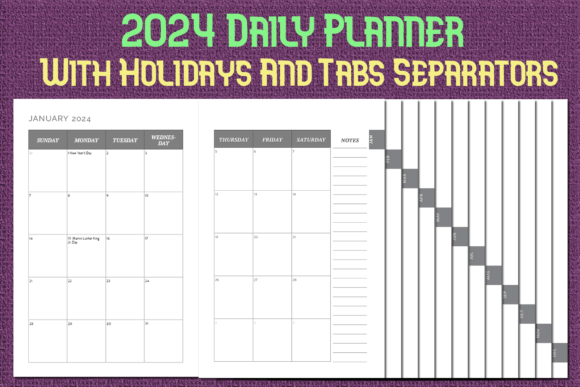
The most instantly practical feature is the tabbed monthly navigation. On each monthly section, a small, printed tab extends to the very edge of the page. When the planner is closed, those tabs fan out slightly, letting you jump straight to July or November with a single thumb movement. This edge-indexing isn’t just about speed—it reduces friction. You’re more likely to check upcoming dates, log an appointment, or review your week when you can access the right page effortlessly. In a busy season, tiny barriers like flipping through fifty pages can cause you to avoid your planner altogether. The tabs remove that hurdle completely, and because they’re printed directly onto the pages rather than added as separate sticky inserts, they won’t peel off or snag inside a bag.
The Elegant Simplicity That Keeps You Coming Back
Many daily planners suffer from over-design: cluttered header bars, motivational quotes that feel forced, color palettes that tire your eyes by March. This planner takes a simple and elegant approach. Typography is clean, spacing is generous, and visual hierarchy guides your eye without shouting. The 6×9 inch format hits a sweet spot—large enough to write in comfortably, yet compact enough to slip into a tote, a laptop sleeve, or a medium-sized handbag. The interior resists the temptation to over-decorate. Lines and grids are functional, ink sits well on standard paper when printed, and the absence of heavy shading means you can photocopy a page without muddy gray blocks. If you’ve ever abandoned a planner because it felt like it demanded more decoration than planning, you’ll appreciate how this one stays out of your way.
Holidays Marked Where They Actually Matter
Pre-printed holiday markers show up in two critical places. First, on the monthly preview page before each month’s daily spreads, so you can see at a glance which days carry a national observance. Second, on the individual daily pages, so when you’re scheduling meetings around a long weekend, the information is right there. This dual notation respects the way people actually plan—sometimes you need the broad scan, sometimes the detail. You won’t write “Memorial Day” on May 27 only to realize it’s already printed for you. And because the file is editable in InDesign, you can easily add federal, regional, or personal holidays if your country celebrates different dates. The base template includes standard U.S. holidays, but the .INDD format hands you full editorial control.
The Bonus 2023 Daily Planner: A Bridge and a Testing Ground
Many planner bundles focus solely on the upcoming year. This one includes a 2023 daily planner as well. For someone purchasing in late 2023 or early 2024, it serves multiple roles. You can use it as a retroactive journal, filling in past events to create a chronological record of the year. It also works as a trial run: print a couple of weeks from the 2023 file at home, test paper weights, try out your favorite pen, and see what writing experience you prefer before committing to a full 2024 print. The two-planner pairing turns a simple purchase into a flexible kit, especially valuable if you plan to adjust the InDesign file to match a specific binding style or paper size.
Editable INDD and Print-Ready PDF: Two Files, Two Different Workflows
Not everyone needs to modify a planner’s interior. Some people want a file they can send directly to a local print shop or upload to an online service without any tinkering. That’s where the upload-ready 6×9 inch PDF comes in. The pages are already sized, margins set, bleed accounted for, and colors converted to the right profile. If, however, you’re a designer, a small shop owner, or someone who simply wants to add a custom cover page, change font styles, or adjust the holiday list, the editable InDesign .INDD file gives you full access. Layered elements allow you to toggle on and off certain design pieces, swap out section headers, or even translate month names. This dual-file approach is rare in planner templates, and it respects the spectrum of users who need either zero friction or total creative authority.
Plenty of Room for Notes Without Cluttering the Layout
Every daily spread in the 2024 Planner with Holidays and Tabs allocates dedicated note space. These aren’t cramped footnotes squeezed into a corner—they’re actual areas where you can jot meal plans, meeting follow-ups, gratitude entries, or even a quick sketch. The note sections are positioned so they balance the structured scheduling area with an open, blank field. This hybrid approach works particularly well for people who loathe separating a bullet journal from a calendar. Instead of carrying two books, you keep one that blends the rigidity of time blocking with the freedom of freeform writing. Over a year, those note sections accumulate into a surprisingly rich personal log.
At-a-Glance Calendar Preview: The Hidden Anchor of Long-Term Planning
Let’s revisit the initial full-year spread because it deserves more credit. When you map out six or twelve months of big-picture goals, that first section becomes a reference index. You might mark each quarter’s end, note seasonal business cycles, or bracket a planned vacation window. Because the spread sits before any month begins, you can turn to it during a moment of quarterly review without losing your place in February’s daily pages. The preview also provides context: if you’re in September and considering a project launch, glancing at the year overview reminds you how many weeks remain before the holiday disruptions of November and December. This top-down perspective is often missing in planners that launch directly into January without any macro view.
Monthly Previews That Do More Than Show a Grid
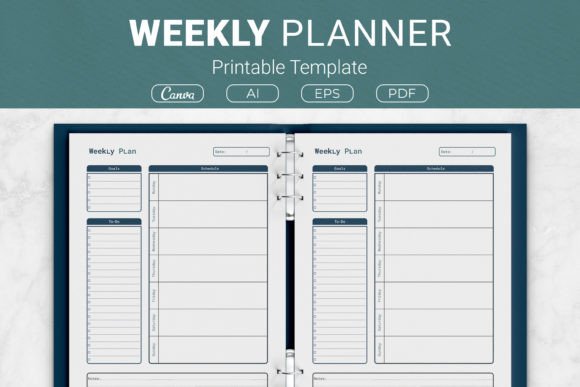
Before each month’s daily section, a dedicated monthly preview page appears. Here, the grid is spacious enough to write a few words per day—perfect for noting birthdays, deadlines with no time attached, or a child’s school break. Holidays are clearly marked, and the layout echoes the same simple elegance of the rest of the planner. By repeating holidays on both this preview and the daily pages, the design prevents double-booking around a public holiday you might otherwise overlook. The preview also acts as a natural divider, giving you a clear visual reset when one month ends and the next begins.
Practical Scenarios Where This Planner Excels
Consider a freelancer managing multiple client deadlines. They open the 2024 Planner with Holidays and Tabs, flick to the May tab using the edge index, and scan the monthly preview to spot Memorial Day. They already know they can’t schedule project milestones that week. They turn to the daily page for May 20 and jot a task list in the note section, then flip back to the year preview to check what other holiday interruptions loom in June and July. The planner’s structure supports this layered, reference-heavy workflow effortlessly. A student, meanwhile, uses the note sections to track reading progress and paper outlines, relying on the monthly previews to mark exam periods. A parent logs children’s activity schedules in the daily blocks while using the year overview to plan family trips around school holidays already pre-marked in the file.
Printing, Binding, and Customization Recommendations
Because the PDF is sized at 6×9 inches with proper bleed, you can print it through any service that handles trade-size books. Spiral binding works perfectly—the pages lie flat and the tabs remain functional. If you prefer disc-bound systems, trim the pages slightly and punch them. The InDesign file can be tweaked to adjust gutter margins for perfect binding or even to add a personal nameplate on the cover. One thoughtful detail: the tabs are printed on the page edge but within trim boundaries, so no special die-cutting is required. That means a standard print run at a local copy shop yields a fully tabbed planner without extra finishing costs. Test with the 2023 daily planner file first to dial in your preferred paper weight and texture before committing the 2024 version.
Why the Simple and Elegant Approach Wins Over Time
Trendy planners sell hard but often feel dated by summer. Embellished layouts crowd the page. A minimalist, simple and elegant foundation, on the other hand, stays neutral and adaptable. Your plans change; your planner shouldn’t fight that with a fixed personality. This design allows your own handwriting, sticky notes, and color-coding to become the primary visual elements. The structure recedes, which paradoxically makes you use it more because there’s nothing to visually tire of. Paired with the functional backbone of monthly tabs, holiday marking, and full-year previews, the restrained aesthetic is a long-term usability asset rather than a compromise.
Seamless Integration Into Modern Hybrid Workflows
Even those deeply embedded in digital tools find a physical counterpart sharpens their thinking. A physical planner offers a singular focus that a screen rarely replicates. The 2024 Planner with Holidays and Tabs bridges both worlds when used alongside a digital calendar: you block time on Google Calendar but reflect on the day’s shape in the planner’s note sections. The monthly tabs let you rapidly flip to the current week during a video call without breaking eye contact with the screen. The pre-marked holidays prevent the embarrassing mistake of scheduling a client call on a federal holiday because your digital calendar’s default holiday layer wasn’t enabled. And because you own the editable InDesign file, you can even incorporate QR codes or short URLs linking to shared digital resources, merging the paper and screen experience on your own terms.
The combination of upload-ready PDF, fully layered INDD, and the companion 2023 daily planner turns a simple template purchase into a customizable planning system. It respects your time by pre-loading structural logic—tabs, previews, holidays, notes—while leaving the creative and editorial decisions in your hands. Whether you print one copy for personal use or rebrand it for a small stationery line, the files provide a robust, thoughtful foundation that prioritizes quiet functionality over passing trends.